MkDocs Setup
This template uses MkDocs with the Material for MkDocs theme for project documentation.
Documentation source files are located in the docs/ directory.
Run documentation locally
-
Install dependencies:
-
Start the local docs server:
-
Open in your browser:
Note
The port may vary based on configuration.
Hosting documentation with GitHub Pages
This repository deploys documentation to GitHub Pages using a GitHub Actions workflow.
- Workflow file:
.github/workflows/docs.yml
The workflow builds the MkDocs site and publishes it automatically when changes are pushed to the configured branch (for example, main).
Tip
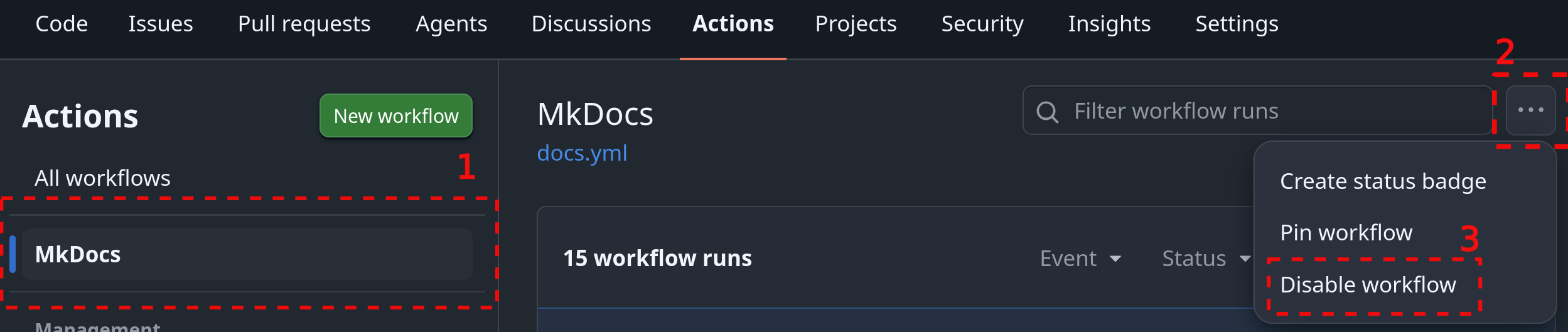
If your repository is private, the workflow will fail without GitHub Pro or Enterprise. In that case, disable the workflow temporarily until you are ready to make the repository public. Go to the Actions tab, select the workflow, and click Disable workflow in the right sidebar.
Typical deployment flow
- Update documentation files in
docs/(and/ormkdocs.yml) - Commit and push changes to the default branch
- GitHub Actions runs the docs workflow
- The site is deployed to GitHub Pages automatically
Configuration notes
- Make sure GitHub Pages is enabled in repository settings
- The Pages source should be set to GitHub Actions
-
If using a project repository site, the published URL is typically:
Git LFS for large files
If your repository contains large files (datasets, binaries, media, generated assets), use Git LFS to keep the repository manageable.
Info
For full documentation, see Git LFS.
Basic setup
Then commit .gitattributes and your files as usual.
Note
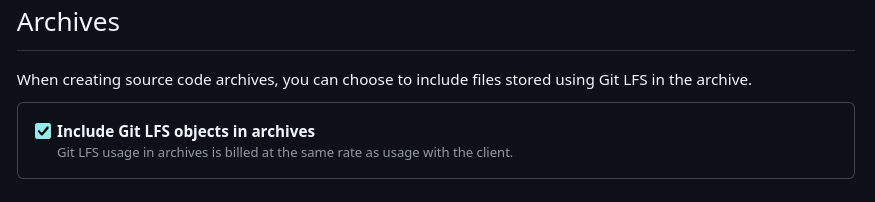
If you publish releases and want Git LFS files included in release archives, enable:
Settings → Archives → Include Git LFS objects in archives
Attribution
If your project uses third-party components, assets, or generated code that require attribution (e.g. UI components from Figma, design systems, libraries under Apache 2.0, BSD, or CC BY licenses), include an ATTRIBUTIONS.md file in the repository root.
At minimum, the attribution file should include:
| Field | Description |
|---|---|
| Component / asset name | What you are using |
| Source platform or author | Where it came from |
| License type | Under what terms |
| Link to original source | URL to the original |
Warning
If a third-party asset's license requires attribution, you are legally required to include it. Do not remove attribution notices from generated or imported code.